Great keyboard somewhat pricey - I love the feel of this keyboard. As far as I can tell, it uses Fox linear switches, and they're very quiet, seem to me (subjectively) similar to a cherry MX brows. The knob works with FreeBSD which was a pleasant surprise. There are no keyboard risers, but the shape of the board makes that unnecessary for me. My main complaint is a minor one. No light comes on or changes when I hit capslock. This may be doable with the software, but I think the software is Windows only. This is a minor complaint and I very much enjoy the keyboard. I'm not a gamer so can't speak for that,but for everyday typing, it's great. One little oddity which might be a Just Me(TM) issue. I use mpv as a video player and one can forward a video 10 minutes with shift+PgUp. With this keyboard, I have to hit PgUp a couple of times for that to work. Other keyboard controls for mpv work as expected. In summation, I really like the feel of this keyboard, and am glad I got it.
 20% off
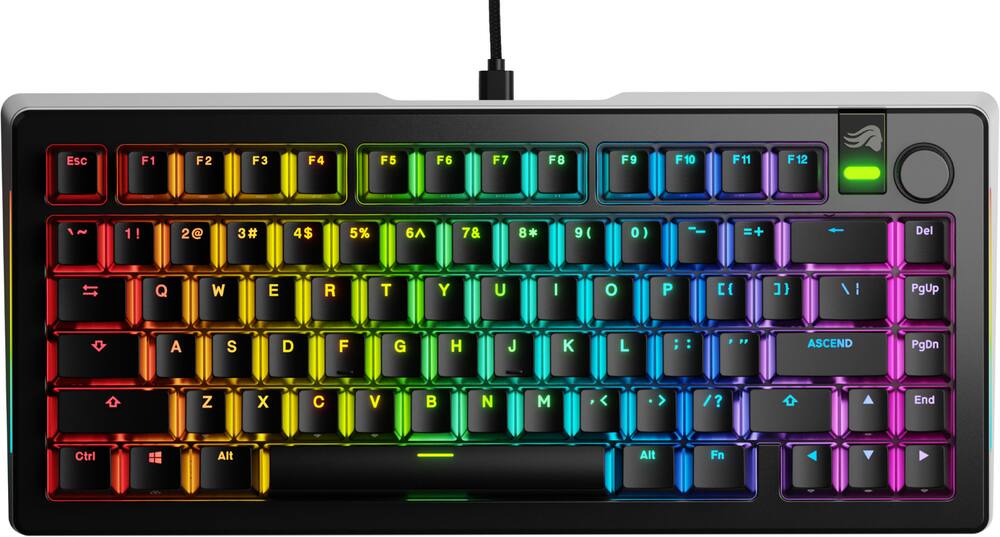
Glorious – GMMK 3 PRO 75% Wired Mechanical Linear Switch Gaming Keyboard with Hot-swappable Switches – Black
SKU: 6586725
$23999
Was $299.99 Save $60.00
Other options in this range
 Sony - INZONE KBD-H75 75% CNC Wired Aluminum Frame Gaming Keyboard with Rapid Trigger - Black Original price was: $299.99.$239.99Current price is: $239.99.
 CORSAIR - VANGUARD 96 RGB Wired MLX Quantum Linear Mechanical Switch 96% Gaming Keyboard with FlashTap SOCD - Dual Tone Original price was: $179.99.$143.99Current price is: $143.99.
 CORSAIR - VANGUARD PRO 96 RGB Wired Magnetic Hall Effect MGX Linear 96% Gaming Keyboard with FlashTap SOCD + Rapid Trigger - Black Original price was: $229.99.$183.99Current price is: $183.99.
Overview
- Full Aluminum Body
CNC-machined top and bottom cases deliver a premium weight and aesthetic, featuring a sleek anodized finish for enduring durability. - 9 Points of Modularity
A highly modular design makes it easy for you to swap the GMMK 3’s parts, tailoring its look, sound, and feel to your exact preference. - Modular Gasket System (MGS)
Easily customize the GMMK 3’s internal gaskets with a simple building blocks-inspired design for a firmer or more flexible typing feel. - 5-pin MX Hotswap Support
Plug and play with our wide range of Glorious MX switch styles to define your GMMK 3’s typing sound and feel, no soldering required. - Sound-Dampening Foam
Two layers of dense foam within the case absorb unwanted resonance for a satisfyingly clean acoustic profile.
Compare similar
Specifications
Capacity & configuration
- Lighting Type
- RGB
- Keyboard Type
- Gaming
- Connection Type
- Wired
Dimensions & weight
- Product Name
- GMMK 3 PRO 75% Wired Mechanical Linear Switch Gaming Keyboard with Hot-swappable Switches
- Product Height
- 1.8 inches
- Product Width
- 13.3 inches
- Product Depth
- 6 inches
- Product Weight
- 62.4 ounces
Features
- Brand
- Glorious
- Color
- Black
- Customizable Lighting
- Yes
- Numeric Keypad
- No
- Touchpad
- No
- Palm Rest
- No
- Spill Resistant
- No
- Keyboard Features
- Hot Swappable, Modular Gasket System, Aluminum Metal Case, Sound Dampening Foam, Fully Customizable, PBT Double Shot Keycaps, Linear Switches
- Foldable
- No
- Keycap Material
- PBT
- Maximum Number of Memory Profiles
- 3
- Form Factor
- 75%
- Number Of Keys
- 80
- Keyboard Technology
- Mechanical
- Dedicated Macro Keys
- Yes
- Adjustable Tilt Function
- No
- Key Switch Behavior
- Linear
- Rollover
- Full-key
- Multimedia Keys
- Yes
- Internet Keys
- No
- Number Of Programmable Keys
- 80
- Actuation Distance
- 2mm
- Actuation Force
- 45g
- Wired Connectivity
- USB-A
- Cable Length
- 5.9 feet
- Detachable Cable
- Yes
- Number of Devices Connectable Simultaneously
- 1
- Operating System Compatibility
- Windows
- Plug and Play Operation
- Yes
- Mouse Included
- No
- UPC
- 840408300186
Power & warranty
- Model Number
- GLO-KB-G3-PRO75-PB-FOX-W-B-US
- Warranty - Parts
- 2 Year Limited Manufacturer Warranty
- Warranty - Labor
- 2 Year Limited Manufacturer Warranty
Warranty & protection
See manufacturer documentation.
Register your product with the manufacturer within 30 days of delivery.
Manufacturer warranty claims are handled by the manufacturer. We are happy to help you find the right contact: (888) 419-6820.
Customer reviews
Write a reviewClicky clacky - I’ve had this for about 2 years now and still feels brand new. It’s expensive but it more than worth the price and the wired option is cheaper and I like the wired look
Good keyboard for the price - Good upgrade from my original gmmk pro. I had purchased open box excellent but it came with a missing key cap, but overall good deal with the open box discount
Great Keyboard - [Employee of bestbuy] heavy high quality keyboard. I would recommned this to any gamer.
Beautiful - Keyboard feels amazing and extremely high quality.
Great gaming keyboard. - No complaints. This is a solid keyboard for gamers.
magic - Very good material and easy to use and very comfortable to wear.
Best keyboard. - Love this keyboard! Nice and sturdy, solid and beefy. Awesome feel.
Amazing keyboard. Glad it is fully swappable!!!!!!
Perfect Budget Light Up Keyboard - Excellent and simple to use. RGB color scheme is bright and keys are responsive.
Excellent entry level mech - Does it have somethings that can be improved on? Yes. But great for wntry level keeb
Awesome Keyboard - The keyboard is higher quality and heavier than others. I like it a lot and would recommend.
This keyboard is truly worth the price - This is now my third linear mechanical keyboard and it is by far my favorite keyboard I’ve ever owned. It feels extremely premium and precise with every push! I love it and would highly recommend it to everyone!
Serious hardware for serious keyboard enthusiasts - I have used mechanical boards for a few years now for the better gaming experience as well as the improved typing experience for working. I’ve always bought full size keyboards since that’s what I’m used to, and I have plenty of desk space. Glorious Gaming keyboards can be purchased on their site with complete customization for you, this board is a “prebuilt”, which means it’s the same components, but Glorious has chosen this combination to create a competitive board you can grab right off the shelf. Once you have the GMMK 3 PRO, you can get a good feel of how this one treats you, and sometime in the future, go full custom, but knowing exactly what you liked and what you might wish was more personal from the prebuilt. Keyboards are getting the attention they deserve and Glorious is in the forefront of the charge. This model is all pre-built, but the components and customization potential are all right here. You can mix and match the types of keyswitches, so you can have tactiles on your WASD and linears elsewhere, etc. Serious customization is readily available in custom colors and materials for cases, different internals including damping options, keyplate options, and of course nearly limitless options for keycaps. This allows you to change how your keys sound, feel, and look. You can not use HE switches on this board, though. I tried. If you would like to use Hall Effect (magnetic/adjustable actuation) switches, you’ll need one of the models with “HE” in the name. Those models will take the newer HE switches as well as the mechanical type the GMMK 3 PRO and most other boards can use. Opening the box, the lid exhorts you to first “Ascend”, then to “Stay Glorious”. No instructions were included for these two functions which I must admit I am not familiar with, so I’m afraid I can’t comment on those. When you take this keyboard out of the box, you can tell just by feeling the weight and materials, this a serious piece of hardware. It feels special, like it should. Setup in a physical sense was a breeze, you plug the included cable into the keyboard, then plug it into your computer. Like any other keyboard. There are a couple of toggles on the back flanking the USB-C port on both sides. While poorly marked, they are explained in the online documentation as a Windows/Mac switch on one side of the USB port, while the other side has a three-position slider to allow you to switch profiles saved on the board without messing around with software. I have yet to encounter another modern keyboard with a feature like this, nice. The software: Glorious CORE 2.1 is functional and appears to work at each task I’ve used it for. According to someone I know with a Glorious keyboard, this is a major milestone in the Glorious CORE software, so kudos there. I am an end user who got a really nice keyboard with ugly, unintuitive software. It has less charm and perhaps a less intuitive user interface than industrial motor control software I’ve used. It works, it’s ugly throwaway cross platform drivel, basically feels like a pretty Java app, a real let down. The LEDs are dim through the keys, even at 100%, this lighting is dim, If you like to see more light, grab a set of pudding keycaps or perhaps some with larger lettering so more light shines through. The included cable is a generic nylon jacketed zig zag you’d get in any mediocre accessory, it’s not pleasant in any way, so I consider it an unnecessary compromise that makes the out of box experience worse. It’s disappointing. When I first started using the board, I felt like I was reaching up to the keys without a wrist rest even though the actual height of the keys themselves is (as far as I can tell) identical to my previous keyboard. The sides flash when you have caps lock on, which is pretty cool until you notice there is no light change on the Caps key itself…. If you have big hands and are going to be doing a lot of typing, this may not be your best solution, it feels slightly cramped. I can only measure a ~5mm difference in width from my main keyboard, but I guess that matters. This keyboard sits right where I put it on the desk while I’m gaming. I don’t have to pull it back to my left hand while I’m in the middle of a match, much better than my last few boards. It even stays put on my slick desk mat thanks to the grippy feet and hefty mass. The action and consistency of the “Fox” (red linear) switches is excellent, precise and solid. I immediately noticed a difference in FPS games, the precision in the board translates to the screen and you can feel the difference. Thanks to the incredible damping, the racket of my gaming has fallen drastically, which is nothing but good. I’m still terrible, but at least I’m quiet about it. I think I qualify as a “gamer”, perhaps not in skill, but surely in hours logged… and as a gamer, I often like to listen to my music or podcasts while I’m gaming. I like having a play/pause button, volume control, and quick mute at the ready. I don’t think this makes me unique. I like the rotary volume knob (metal and grippy, so nice!), and I like that clicking the knob mutes my audio by default. I did not know the little badge bar next to the knob is just a logo plate with a light on it even though it looks like a button. So, the play/pause key is (without changing keybinds) Fn-F7. Two key combo to play/pause. The way I figured this out required a flashlight. The secondary F-key functions are marked with faint paint on the vertical front faces of the keycaps. keys that are invisible without direct light shining on the board. Of course, you can memorize these locations, but this is a compromise that was unnecessary and is a glaring omission in my opinion. Looking at the bottom of the keycaps shows the translucent plastic that carries light is continuous underneath, so it was a choice to not have the secondary functions shine through. There are also secondary functions for lighting, for which some of the silk-screened icons are intuitive and others are just mysterious. Which is why---- My biggest issue with this board is the keycaps. I would even call them a disappointment. I understand it’s all about customization, and many of us are going to eventually get custom keycaps to suit our preferences, but these sure seem to be made to make you WANT to get some other set. The Enter key doesn’t say Enter or Return or even the down and right arrow, nope, it says “ASCEND”. Tacky. Cynical. Ew. I don’t ever want to be marketed to by my enter key. Ever. It’s a keyboard, not a lifestyle. This would be a non-issue if they gave me a standard return key in the box… The markings on the keys are non-standard to the point of being odd, instead of the 100 year old convention of putting the key markings one above the other (indicating a “shift”), they have the markings crammed together horizontally, not so great for hunting down that one punctuation key you never remember the location of. The keys have no lighting for secondary F-key functions, either direct from shine-through, or indirect from light coming up from under. So, gaming in the dark, you better have those Fn binds memorized, cuz you’re not finding them by looking. Nothing like trying to blindly hit Fn-F7 to pause my music to run to the bathroom to find I accidentally hit F8, which should have just paused, but stopped the music, so I get to Alt-Tab and mess with my music program rather than hitting play and going back to my game. This could have been avoided easily by making the not-a-button logo plate next to the volume knob a button. Play/pause, click twice for skip, etc. Other TKL boards I have looked at managed to keep this functionality even with the small footprint, so no excuse there. To me, this keyboard is gaming first. I think this would be a great keyboard for someone who plays primarily shooters and is most concerned with switch performance/feel and likes to tinker. If you’re looking to get a super-premium daily driver to happily use as-is out of the box, you can get more check-boxes for less, but in many cases you lose the complete customization options. For desktop work there are just too few keys, or it winds up being an exercise in figuring out what compromises I want to make with rebinds, since there are simply not enough keys here to keep me working smoothly. When used for gaming, the customization and compact size make it better than a lot of the mainstream boards and setting up rebinds and profiles can really improve your gameplay. The best part of using the GMMK 3 Pro is after you’ve spent plenty of time setting it up exactly the way you like, making use of layers, profiles and lighting, this keyboard will probably make you a better gamer, and once it’s completely set up to your preferences, it sure does feel like home. In general, this is a very quiet, crazy responsive keyboard. It feels smooth and precise in action. The cable and keycaps are both compromises in my opinion, but not showstoppers. With a little bit of customization, this is easily the best gaming board I’ve used.
A factory pro level keyboard ready to customize! - I am incredibly impressed with this keyboard. It feels so good to leave the expensive but often underfeatured mainstream gaming PC peripheral companies behind to try out a keyboard from a company trying to do things differently for the price. The marketing for this device says that Glorious makes the world’s most customizable gaming keyboards, and I am pretty inclined to endorse this claim judging from what I am seeing. This keyboard is fully equipped for users to try things out and get the experience they want from this device. It comes equipped in this model with Glorious Fox red linear switches, and they are absolutely some of the nicest red switches I have ever tried. The accuracy, smoothness, and repeatability of these keys are astonishing and refreshing in standard typing and gaming scenarios with frenetic and rapid key tapping. As if it wasn’t enough to have the factory switches ready to go out of the box, Glorious includes a sample pack of switches for you to sample, complete with puller tools and instructions. I found that the included sample of the Raptor (crisp and clicky) switch felt really good and that may be where I go in the future with my keyboard. Customizability features such as RGB and macros programming are excellent in the Glorious Core software. They are easy to navigate and far more intuitive than other competing gaming peripheral software I have tried, like iCUE. Good on you, Glorious! A cool and unique feature of this keyboard is the true support it offers for MacOS users. Rather than just being a plug-and-play keyboard that misses out on some of the shortcuts and features of a proper MacOS keyboard, Glorious gives you the means to make that a reality! They included two option keycaps and two command keycaps (crucial for those great shortcuts in productivity work), and there is even a switch built into the keyboard on the back that switches it from Windows OS features to MacOS! That is super awesome and supports that this as a highly flexible and dynamic keyboard for all users. The build quality of this keyboard is amazing and judging from what I can tell, is on par with some of the higher-end customizable keyboards out there. The all metal construction results in this being a solid and heavy keyboard which speaks highly to its pro status. I chose this specific wired model because, as a streamer and a gamer, I have realized that wireless devices often introduce reliability and connectivity issues into the mix that can mess up a stream or my gaming performance. Furthermore, battery life anxiety is something I don't particularly appreciate having to tolerate for multiple devices. My headsets are always wireless, but I do not mind my keyboard and mouse being wired, plain and simple. Altogether, relative to the crap household brand companies are trying to stuff down our throats as a good value when they aren’t in this price range, I am going to give this keyboard a solid and well-earned 5 stars out of 5. I will be recommending this keyboard to all of my friends. Thanks for reading and hope this review has helped you out!
The ultimate mini gaming keyboard... - Gaming keyboard for the professional gamer. The keys are the most responsive that I have ever used. They almost anticipate my keystrokes. I really like the very solid feel and weight of the keyboard. I think the only thing I would have preferred is a full size option. The software download from the website was very easy to do and quick to install. I think I personally prefer a keyboard with the keys that are spaced a little better or normal if you would. The included tools and replacement parts are great includes to find in the box. I also this that the brightest setting could be slightly brighter. It is nice that the included packaging is all recyclable. I liked that the lighting options are pretty exhaustive including all standard options. The included USB A to USB C cable is a nice quality cable and should stand up to any normal gaming sessions. I would recommend this keyboard to anyone who wants to make a statement and prefers a smaller keyboard footprint. You will be happy with the performance and build of this keyboard.
Glorious keyboard evolved! - The latest keyboard lineup and specifically the GMMK 3 Pro is a great addition and upgrade to my setup! I’ve been using mechanical keyboards for over 9 years and they have certainly evolved over the years. The focus is now a lot on enthusiasts who want to be able to tinker with different feels, switches, and settings. This board does all that and is still a great performer! Unboxing/setup/first impressions: Taking the keyboard itself out the box gave me a sense of confidence as this thing is heavy! I went ahead and got a feel of the stock switches that come with this - the Fox linears, and they felt great and smooth right out the box. After that you will find a ton of extras located in the pockets which I won’t lie had me overwhelmed a bit at first, but I quickly figured out what everything was for and it’s nice that it’s all included. Speaking of which… What’s included - Keycaps for mac users, switch & keycap puller, 3 sample switches (Fox, Panda, and Raptor) o-rings, gasket modules, and a screwdriver. Design: The keyboard is made almost entirely out of metal and is placed in a rather thick case with large bezels all around - it's a 75% board but it surprisingly feels “chonky” which I don’t like and would have much rather seen a thinner case and bezels. Besides the usual keys you also get a nifty metal volume knob which doubles as a mute switch when pressing it - great for functionality! The stock Glorious branded double shot PBT keycaps are mostly recessed into the board, and they feel great with no wobble at all. I’m also surprised how well RGB shines through these given they are PBT and not ABS. There is no height adjustment on the backside, but for me it was already perfect. Near the middle where your USB-C cable plugs in you also get toggle buttons for Windows/Mac and cycling between profiles (3 total) Features/performance: This board focuses a lot on customizability and it’s a board you can “build upon” you can safely take this board apart and it’s more beginner friendly. Besides the usual customizations you can do like - custom cable, keycaps, and switches (supports 3 pin or 5 pin) you can also tune things like the gaskets if you prefer a certain cushioned feel. I personally like how everything feels stock and would only change the keycaps and switches if I ever get bored, but it’s nice that I’m not limited to just that if I change my mind. In terms of performance everything is on point! In-game everything felt responsive and it's a great option for all games especially FPS titles where the short travel distance of the Fox switches means you’re getting almost instant responses. It’s not the fastest keyboard in the world, but certainly is still fast enough for modern standards. Build/QC: The build is solid like a tank! No parts are loose or feeling off. My only minor complaint is the stock cable feels a bit loose, but I’ve tried others and they felt more snug so it’s something that can always be changed. Software: Last thing I want to mention is the new Glorious Core 2 software - everything is easy to find and access, but it’s definitely been buggy to start off. RGB settings don’t preview properly, the save toggle is weirdly labeled, and it’s generally slow. Hopefully it improves in the future, but at least you can save your settings to the board. I highly recommend the Glorious GMMK 3 Pro 75%! Pros: * Customizability * Performance * Sound and feel * 75% layout with volume knob * RGB Cons: * Bulky design * Software needs work
This Thing's Heavy! - ***Introduction:*** Is this a device of a quality which fits the cost? Let’s talk about that. ***General Quality:*** The Glorious GMMK 3 PRO has many features that feel premium in quality. Firstly, the chassis is a very satisfying - and heavy - aluminum. My friends and I were all startled by the weight. The keys are made of a sturdy, textured plastic that feels almost like cerakote - very fitting for the aesthetic of the chassis. ***Typing Experience:*** The typing experience is mixed, with varied-size keycaps equaling varied input pressure required to activate them. The shape of the keys is like a vertical channel, which makes it easy for fingers to land confidently. The home row indicators are prominent enough to make finding them with your index fingers quick, though unintrusive. The travel is smooth and quiet, although the spacebar makes a markedly louder and distinguished sound compared to the rest. You may end up driving co-workers and/or significant others crazy by the sound of it, should you find yourself typing often. ***Volume Knob and Controls:*** The “volume” knob (programmable to function as other things) is a quality, knurled aluminum, which would be satisfying to interact with if the actual sensor underneath were fundamentally different. The look is that of premium audio equipment, but the feel is that of an inexpensive middle mouse wheel. ***Lighting and Color Options:*** Key color options are numerous, including activation of specific keys with specific colors, key regions, or the whole keyboard. You can actually set very specific color and behavior options using the Glorious CORE Software. Colors shine through with a low to medium brightness - not bright enough to dazzle in a regularly-lit (office) environment. If you prefer you can use the software set up “macros” - which allow you to perform custom actions via button combinations. ***Customization and Key Cap Swapping:*** The ability to change out caps to integrate better with a Mac system is definitely welcome, though the space available around the key caps to use the included plastic cap-puller is minimal. Only the metal puller was narrow enough to be able to fit around the escape key - you have to slide it over the cap to get to the bottom of the base, and I didn’t want to scratch the cap, so I didn’t try pulling esc. I did successfully pull the Q cap, however, utilizing the additional room available where other caps are staggered. I didn’t try replacing any switches. ***Device Integration and Toggles:*** There is a toggle on the back of the keyboard to swap it to easily integrate as a Mac-specific device. There is another, 3-way toggle I’m not sure about (documentation was lacking)—perhaps a switch for custom typing/macro modes. ***Conclusion:*** Overall, I like the device for many reasons, but the inconsistent weight of keypresses, mixed with the annoying sound of the spacebar, the non-premium feel of the programmable knob, and the potential to scratch your key caps while changing them, knocks the rating down for me to a 4 star. -HighlyExcellent
Best Keyboard I have ever used - The Glorious GMMK 3 Pro is by far the best keyboard I have ever used. This is a highly customizable mechanical keyboard. It features a full aluminum body, hot swappable switches, sound dampening foam, and 9 points of modularity. From the moment you open the box, you easily get the premium feel. The first thing you'll notice about the keyboard itself is the weight. This is easily the heaviest keyboard I've ever felt. Inside the box you'll find the keyboard, usb cable, alternate Mac keys, key and switch tools, a screw driver, and a couple of sample switches that GMMK offers. Everything is well packed and organized in the box, adding to the premium feel. Once I got this keyboard plugged in, I instantly felt the difference between this and every other keyboard I've ever used, mechanical or otherwise. The keys provide a perfectly tactile feel, without being too clicky or loud. The aluminum base provides a sturdy foundation that will not slide around on you due to its aforementioned hefty weight. And while being a mechanical keyboard, it is surprisingly quiet, thanks to the sound dampening foam in the case. One thing I have noticed about a lot of other mechanical keyboards I've used is how loud they are, not just because of the keys, but because of like the echo or resonance or whatever that the case gives off. I had just come to believe that this is an inherent aspect of all mechanical keyboards. I was very happy to see that Glorious has solved this issue. The keyboard also features RGB lighting, which can be customized using the Glorious software. It's rather straightforward, but also allows for an amazing level of customization. You can of course pick through a handful of premade effects, which is fine for me. But you can also create your own, down to each individual key. Finally, this is a 75% layout keyboard, which I thought meant that the keys would somehow be smaller. But no, all it means is that the overall footprint is 75% of a full size keyboard. They achieve this by getting rid of the number pad as well as any extraneous keys, like dedicated media control and stuff like that. The layout of this keyboard is about as bare bones as it gets, which allows for that space saving design. They do manage to include a volume knob, which can actually be customized if you don't care about volume control. In conclusion, this is easily the best keyboard I have ever used. It feels amazingly well-made and offers a ton of customization options. And the user experience is the best of any keyboard I have ever used. I definitely recommend if you are looking for a great mechanical keyboard.
Excellent keyboard. - I have been using some very cheap keyboards. Why do I say this? Based on the weight of this bad boy alone it is in a different category than the most of the others on the market. When I received this and picked it up I thought I got shipped a box of bricks at first, the thing is heavy. Opened up the box and saw that nice matte black finish and pretty much ran to my rig and hooked it up. Keys feel good. Nice sound to them if you are into that kind of thing.😉 Had to get used to the 75% keyboard but now that I am there is no going back to a full sized monster on my desk. I have gotten used to the RGB backlit keyboard and the multiple choices of of zones and actions from the keyboard. Braided USB-C cable is a nice touch. Has enough length to reach a computer that is on the floor further away your desk. Haven't had a need to pull any of the keys out yet to try different kinds but I do like the additional key caps to use this keyboard with the MAC. So many things that I have not gotten to with this keyboard. Hopefully it will stand up to the test of time and not break after a few months.
Questions & answers
Ask a question
Email [email protected] or call (888) 419-6820 during business hours.
Add your review